


Showing posts with label PS tutorial. Show all posts
Showing posts with label PS tutorial. Show all posts
This tutorial is probably one of the easiest way to change eye color. First thing you need to do is to go to this link http://www.brushesdownload.com/bfile.asp?id=3113 and download the Contact Lense PS Brush. After downloading, here are the steps to follow.
STEP 1: Choose “Brush Tool”

STEP 2: “Right Click and load the Contact Lense PS Brush.

STEP 3: Create “New Layer”

STEP 4: Change MODE to “Soft light”.
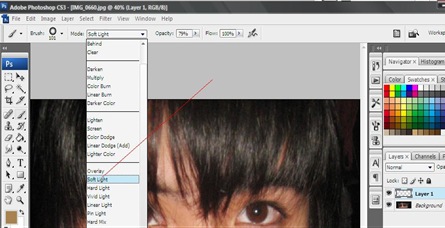
STEP 5: Adjust Opacity.

STEP 6: Point Contact lense PS brush on eye lens.

STEP 7: Use “Eraser Tool” to remove excess brush.

Then it’s done!
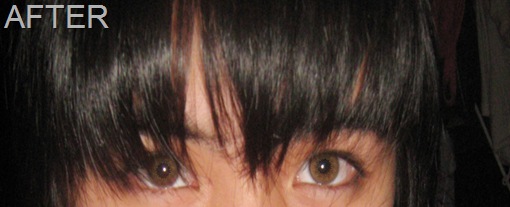
Here is the result:

This tutorial is one of many ways to remove pimples by using Photoshop.
STEP 1: Choose “Spot Healing Brush tool”

STEP 2: Adjust the brush diameter.

STEP 3:

Three steps and it’s done!
Here is the result:


IMAGE SOURCE: GOOGLE
Here is a very simple tutorial on how to dye hair using Adobe Photoshop. If you want to try different colors on your hair and want to see If it fits you, then you must’ve try this tutorial.
STEP 1: Choose “Brush Tool”. Use Soft Brush.

STEP 2: Choose “SOFT LIGHT”. Opacity depends on you (On how strong you want your hair color to be)

STEP 3: Choose your desired color.

STEP 4:

Easy right? Here is the result:


